In Cologne three different products are manufactured (TETD, TMDT and DPTT) in four different versions, i.e. crystals, powder, oiled powder and granulated material. The bulk materials are filled into 50 different packagings.
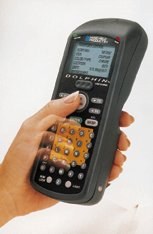
Looking for a solution provided by one supplier Flexsys chose the Dolphin system. A Windows computer including Microsoft Excel was already available, which then should be the basis for the software solution. Furthermore, it was very important being able to extend and to adapt this application at Flexsys without problems.
First of all, with the aid of a thermal transfer printer, all storage places in the warehouse were equipped with a bar code label. Now, this label printer is used for printing pallet labels (100 x 100mm) containing an interleaved 2/5 bar code. This bar code consists of a 10-digit lot number including a 6-digit, automatically updated date, a 2-digit charge number, 2 digits of constant data „00“ and a 3-digit pallet number. The pallet number is a tracking number within a production packaging unit, whereas the last number of a print run must be stored in order to be able to start a new print run with the next valid tracking number. Creating of labels, accessing the printers as well as automatically updating the label contents (date, tracking number, saving the last tracking number of each production unit) were organized with the aid of the labelling software „Legi for Windows“. A database in Legi for Windows stores all required information, as well as the last pallet number used for this article. A 3-digit article number is additionally printed as human readable text on the label. In order to simplify matters, a large number of Legi for Windows functions were defined as macros and configured as icons displayed on the computer screen.
Now, all the user has to do is double-click the icon and select the right article number and the entire label with all valid and updated information is printed. Parallel to this, data collection with Dolphin starts in the following three areas:
• At first, after production, the pallet labels are scanned. At irregular intervals, Dolphin is placed in the homebase and starts to transfer the data collected to the PC. For this purpose, the software „Spreadsheet Simplicity for Batch SSI“ ensures that all data is transferred correctly from/to Microsoft Excel. Now Excel divides this bar code into separate pieces of information and sorts these into different columns and tables. Sorting and evaluation is performed by a Microsoft Excel macro before the data is transferred to the ERP system. There, all the pieces of information are compared, evaluated and transferred by data communication to the central host of Akzo Nobel.
• When handing over the pallet from the production area to Logistics, the bar codes on the pallet are scanned. The date and time of scanning are added automatically by Dolphin. After collecting the data, Dolphin is placed into the homebase and the data is transferred from Dolphin to Microsoft Excel. The data collected is now sorted, saved and printed in five columns (lot number, pallet number, item, date, time) and then passed on to a global open operation management system.